
Summary
Learn how to navigate and interpret the Lead capture dashboard to monitor enquiry performance and track buyer engagement.
This article covers:
Overview
The Lead capture dashboard provides insights into buyer enquiries and listing performance. It helps your office track how effectively leads are being captured from portals such as realestate.com.au (REA) and Domain, as well as identify active buyers and high-performing listings.
To open the dashboard:
- Go to: More > Lead Capture
This dashboard provides a visual summary of how lead capture is performing across your listings and contacts.
Dashboard sections
Dashboard filters
The Filter button allows you to customise the dashboard data:
- Consultant filter - If your permissions allow, you can filter results by consultant to view individual performance
- Data range - The reporting period from which you can choose to display data from the past 7, 30, or 60 days
Unprocessed enquiries
Unprocessed enquiries will appear in this section when lead capture can't match an enquiry to a single contact record (e.g., multiple contacts with the same email).
- Click the red hyperlink to review and manage these unprocessed enquiries manually
This ensures that every lead is linked to the correct contact record.
Properties sold with lead capture
This section shows the total number of sold listings where the purchaser enquiry came through lead capture.
This metric highlights the direct impact of lead capture on completed sales.
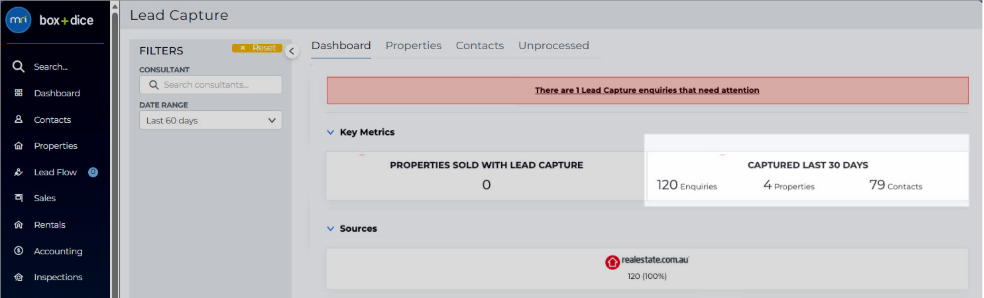
Lead capture performance summary
This section displays how lead capture has contributed to enquiries over the past:
- 7 days
- 30 days
- 60 days
This provides a quick snapshot of recent activity and lead generation trends.
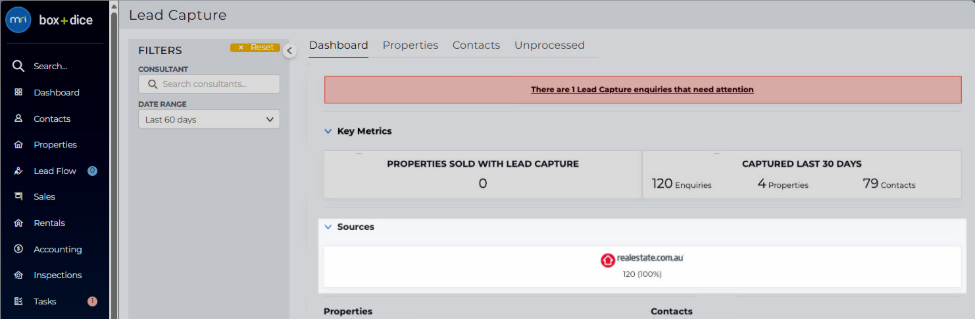
Enquiry source comparison (REA vs Domain)
This section compares enquiries received from realestate.com.au and Domain. Use this section to identify which portal drives more enquiries within the selected time frame.
Active listings with enquiries
This section lists all active properties that have received enquiries via lead capture in the past 7, 30, or 60 days.
- Click the property address to open the listing and view related enquiry details
Active Enquirers
This section shows contacts who have enquired in the past 7/30/60 days, along with their total number of enquiries. Use this section to identify repeat or high-interest buyers.
- Click the contact's name to open their Contact Card for a detailed view
Articles in this section
- Configure domain.com.au to send enquiries to Box+Dice
- Configure lead capture auto-responder
- Configure lead capture tasks
- Configure realestate.com.au to send enquiries to Box+Dice
- Enable Lead Capture
- Lead Capture for Rentals
- Manage lead capture access for an office
- Manage unprocessed leads in Lead Capture
- REA Project Lead Capture
- Resolve missing or unmatched enquiries